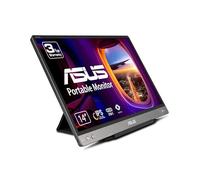
ASUS MB14AC computer monitor 35.6 cm (14") 1920 x 1080 pixels Full HD Grey
Asus ZenScreen MB14AC 14" IPS Monitor, 1920 x 1080 Full HD, 60Hz, 5ms

Based on a total of 513 customer reviews from independent review platforms.
Sources & Transparency:
The values are derived from publicly available retailer ratings from platforms such as Feefo, http://Reviews.io , Trustpilot, and others, and are aggregated monthly.
All brand names and logos are the property of their respective owners.
Notice:
pricehunter.co.uk cannot guarantee that published shop ratings originate from consumers who have actually made a purchase from the reviewed retailer.
ASUS ZenScreen MB14AC Portable USB Monitor- 14 inch, IPS Full HD, Hybrid Signal Solution, USB Type-C, Flicker Free, Blue Light Filter, Anti-glare surface

Based on a total of 70 customer reviews from independent review platforms.
Sources & Transparency:
The values are derived from publicly available retailer ratings from platforms such as Feefo, http://Reviews.io , Trustpilot, and others, and are aggregated monthly.
All brand names and logos are the property of their respective owners.
Notice:
pricehunter.co.uk cannot guarantee that published shop ratings originate from consumers who have actually made a purchase from the reviewed retailer.
Asus Zenscreen Mb14Ac 14" Wide Ips Wled Dark Grey Usb Type-C Monitor (1920X1080/5Ms/usb)

Based on a total of 39,542 customer reviews from independent review platforms.
Sources & Transparency:
The values are derived from publicly available retailer ratings from platforms such as Feefo, http://Reviews.io , Trustpilot, and others, and are aggregated monthly.
All brand names and logos are the property of their respective owners.
Notice:
pricehunter.co.uk cannot guarantee that published shop ratings originate from consumers who have actually made a purchase from the reviewed retailer.
ASUS ZenScreen MB14AC Portable USB IPS Full HD Monitor - 14 Inch

Based on a total of 78,682 customer reviews from independent review platforms.
Sources & Transparency:
The values are derived from publicly available retailer ratings from platforms such as Feefo, http://Reviews.io , Trustpilot, and others, and are aggregated monthly.
All brand names and logos are the property of their respective owners.
Notice:
pricehunter.co.uk cannot guarantee that published shop ratings originate from consumers who have actually made a purchase from the reviewed retailer.
Asus - Zenscreen Mb14Ac Portable Usb 14Inch Ips Fhd - pctablet - P2222z

Based on a total of 24,032 customer reviews from independent review platforms.
Sources & Transparency:
The values are derived from publicly available retailer ratings from platforms such as Feefo, http://Reviews.io , Trustpilot, and others, and are aggregated monthly.
All brand names and logos are the property of their respective owners.
Notice:
pricehunter.co.uk cannot guarantee that published shop ratings originate from consumers who have actually made a purchase from the reviewed retailer.
ASUS ZenScreen Portable Monitor 14" 1080P FHD Laptop Monitor (MB14AC) - IPS USB-
Based on a total of 24,032 customer reviews from independent review platforms.
Sources & Transparency:
The values are derived from publicly available retailer ratings from platforms such as Feefo, http://Reviews.io , Trustpilot, and others, and are aggregated monthly.
All brand names and logos are the property of their respective owners.
Notice:
pricehunter.co.uk cannot guarantee that published shop ratings originate from consumers who have actually made a purchase from the reviewed retailer.


Cheapest offer
🤖 Ask ChatGPT
Product Information
Other features
| Certification | BSMI, CB, CCC, CU, FCC, J-MOSS, KCC, UkrSEPRO, UL/cUL, VCCI, WEEE, WHQL (Windows 10, Windows 8.1, Windows 7), TUV Flicker-free, TUV Low Blue Light, RCM |
Logistics data
| Harmonized System (HS) code | 85285210 |
Packaging content
| Cables included | USB Type-C to USB Type-C |
Packaging data
| Package weight | 1.3 kg |
| Package height | 257 mm |
| Package depth | 77 mm |
| Package width | 392 mm |
Weight & dimensions
| Weight (with stand) | 590 g |
| Height (with stand) | 208 mm |
| Depth (with stand) | 11.2 mm |
| Width (with stand) | 324.9 mm |
Operational conditions
| Operating temperature (T-T) | 0 - 40 °C |
Power
| European Product Registry for Energy Labelling (EPREL) code | 419756 |
| Energy efficiency scale | A to G |
| Power consumption (PowerSave) | 0 W |
| Power consumption (off) | 0 W |
| Power consumption (typical) | 7 W |
| Energy consumption (SDR) per 1000 hours | 5 kWh |
| Energy efficiency class (SDR) | B |
Ergonomics
| LED indicators | Yes |
| Height adjustment | No |
| Cable lock slot | No |
| VESA mounting | No |
Ports & interfaces
| HDCP | Yes |
| Headphone out | No |
| Audio input | No |
| HDMI | No |
| DVI port | No |
Design
| Product colour | Grey |
| Market positioning | Business |
Multimedia
| Built-in camera | No |
| Built-in speaker(s) | No |
Performance
| Low Blue Light technology | Yes |
| Flicker-free technology | Yes |
Display
| Display diagonal | 35.6 cm (14") |
| Viewable size diagonal | 35.6 cm |
| Viewable size, vertical | 17.4 cm |
| Viewable size, horizontal | 30.9 cm |
| Pixel pitch | 0.16 x 0.16 mm |
| Display number of colours | 16.78 million colours |
| Viewing angle, vertical | 178° |
| Viewing angle, horizontal | 178° |
| Maximum refresh rate | 60 Hz |
| Contrast ratio (typical) | 700:1 |
| Aspect ratio | 16:9 |
| Supported graphics resolutions | 640 x 480 (VGA), 800 x 600 (SVGA), 1024 x 768 (XGA), 1280 x 1024 (SXGA), 1280 x 960, 1440 x 900 (WXGA+), 1680 x 1050 (WSXGA+), 1920 x 1080 (HD 1080) |
| Screen shape | Flat |
| Response time | 5 ms |
| Display brightness (typical) | 250 cd/m² |
| Touchscreen | No |
| Panel type | IPS |
| Native aspect ratio | 16:9 |
| HD type | Full HD |
| Display resolution | 1920 x 1080 pixels |
Product information
At a glance
- 14-inch Full HD display for vibrant visuals
- Lightweight at 0.78 kg for easy portability
- Eye-care technology minimizes strain during use
Note: This text was created with the help of AI.
Perfect for On-the-Go Professionals
The ASUS ZenScreen MB14AC is an ideal companion for busy professionals, students, or anyone who needs to enhance their productivity while on the move. This portable monitor offers a seamless multitasking experience, especially for those who often work with laptops or need a second screen for presentations. With its sleek, lightweight design and easy connectivity options, it’s perfect for people who value efficiency and require a high-quality display wherever they go. For a wider selection of Monitors, check out our comprehensive listings!
Exceptional Features and Functionality
The ASUS ZenScreen MB14AC packs a punch with its 14-inch Full HD display, boasting a stunning resolution of 1920 x 1080 pixels. This ensures that images are sharp, vibrant, and rich in detail, making it perfect for everything from detailed design work to streaming your favorite shows. The monitor is equipped with USB-C connectivity, allowing for easy plug-and-play functionality, and it supports power delivery to charge your devices while you work. Plus, the built-in battery means you don’t have to worry about finding a power outlet while you’re on the go!
Sleek Design Meets Practicality
One of the standout aspects of the ASUS ZenScreen MB14AC is its stylish and compact design. Weighing in at just 0.78 kg, this monitor is lightweight enough to fit in your backpack, making it the ultimate portable solution. The ultra-slim profile of just 8mm ensures that it doesn’t take up much space, while the durable casing adds a touch of elegance. The monitor also features a smart cover that can be used as a stand, providing versatile viewing angles for your convenience. Whether at a café, in a meeting room, or on a long journey, you’ll appreciate how easy it is to set up and use!
Enhanced User Experience
Another impressive feature of the ASUS ZenScreen MB14AC is its eye-care technology, which is designed to reduce eye strain during long working hours. The Flicker-Free technology and Blue Light Filter help to create a comfortable viewing experience, allowing you to work for extended periods without discomfort. Additionally, the monitor offers multiple display modes, making it adaptable for different tasks, whether you’re working with documents, graphics, or media. With its combination of functionality and user-friendly features, this monitor truly stands out in the realm of portable displays!
Note: This text was created with the help of AI.
How well did the information meet your expectations and assist you further?
 Not at all

 Neutral

 Very much
Similar products