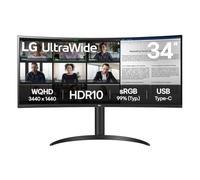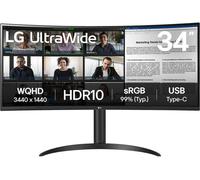
LG 34WR55QK-B computer monitor 86.4 cm (34") 3440 x 1440 pixels Wide Quad HD Black
34 inch LG Curved Monitor Ultrawide VA Panel WQHD 1440p Display port HDMI USB-C.

Based on a total of 22,795 customer reviews from independent review platforms.
Sources & Transparency:
The values are derived from publicly available retailer ratings from platforms such as Feefo, http://Reviews.io , Trustpilot, and others, and are aggregated monthly.
All brand names and logos are the property of their respective owners.
Notice:
pricehunter.co.uk cannot guarantee that published shop ratings originate from consumers who have actually made a purchase from the reviewed retailer.
34 inch LG Curved Monitor Ultrawide VA Panel WQHD 1440p Display port HDMI USB-C
Based on a total of 22,795 customer reviews from independent review platforms.
Sources & Transparency:
The values are derived from publicly available retailer ratings from platforms such as Feefo, http://Reviews.io , Trustpilot, and others, and are aggregated monthly.
All brand names and logos are the property of their respective owners.
Notice:
pricehunter.co.uk cannot guarantee that published shop ratings originate from consumers who have actually made a purchase from the reviewed retailer.
LG 34WR55QK-B Monitor

Based on a total of 63 customer reviews from independent review platforms.
Sources & Transparency:
The values are derived from publicly available retailer ratings from platforms such as Feefo, http://Reviews.io , Trustpilot, and others, and are aggregated monthly.
All brand names and logos are the property of their respective owners.
Notice:
pricehunter.co.uk cannot guarantee that published shop ratings originate from consumers who have actually made a purchase from the reviewed retailer.
LG 34WR55QK-B Monitor
Based on a total of 63 customer reviews from independent review platforms.
Sources & Transparency:
The values are derived from publicly available retailer ratings from platforms such as Feefo, http://Reviews.io , Trustpilot, and others, and are aggregated monthly.
All brand names and logos are the property of their respective owners.
Notice:
pricehunter.co.uk cannot guarantee that published shop ratings originate from consumers who have actually made a purchase from the reviewed retailer.


Cheapest offer
🤖 Ask ChatGPT
Product Information
Other features
| Picture-by-Picture (PbP) | Yes |
| Brand specific technologies | Black Stabilizer, DAS Mode |
Packaging content
| Cables included | USB Type-C |
| Stand included | Yes |
Packaging data
| Package weight | 10.3 kg |
| Package height | 523.2 mm |
| Package depth | 10.8 mm |
| Package width | 985.5 mm |
Weight & dimensions
| Weight (without stand) | 4.99 kg |
| Height (without stand) | 358.1 mm |
| Depth (without stand) | 91.4 mm |
| Width (without stand) | 810.3 mm |
| Weight (with stand) | 6.89 kg |
| Height (with stand) | 569 mm |
| Depth (with stand) | 259.1 mm |
| Width (with stand) | 810.3 mm |
Power
| Energy efficiency scale | A to G |
| Power supply type | External |
| AC input frequency | 50/60 Hz |
| AC input voltage | 100 - 240 V |
| Power consumption (off) | 0.5 W |
| Power consumption (standby) | 0.5 W |
| Energy consumption (HDR) per 1000 hours | 45 kWh |
| Energy consumption (SDR) per 1000 hours | 28 kWh |
| Energy efficiency class (HDR) | G |
| Energy efficiency class (SDR) | F |
Ergonomics
| On Screen Display (OSD) | Yes |
| Tilt adjustment | Yes |
| Height adjustment | Yes |
| Panel mounting interface | 100 x 100 mm |
| VESA mounting | Yes |
Ports & interfaces
| Headphone out | Yes |
| DisplayPorts quantity | 1 |
| HDMI ports quantity | 2 |
| HDMI | Yes |
| USB Power Delivery up to | 65 W |
| USB Power Delivery (USB PD) | Yes |
| USB Type-A downstream ports quantity | 1 |
| Number of USB Type-C upstream ports quantity | 1 |
| Built-in USB hub | Yes |
Design
| Product colour | Black |
| Market positioning | Business |
Performance
| Smart modes | Energy saving |
| Flicker-free technology | Yes |
Display
| Display diagonal | 86.4 cm (34") |
| Colour gamut | 99% |
| Colour gamut standard | sRGB |
| High Dynamic Range (HDR) technology | HDR Effect, High Dynamic Range 10 (HDR10) |
| High Dynamic Range (HDR) supported | Yes |
| Display diagonal (metric) | 86 cm |
| Pixel pitch | 0.2318 x 0.2318 mm |
| Display number of colours | 16.7 million colours |
| Viewing angle, vertical | 178° |
| Viewing angle, horizontal | 178° |
| Maximum refresh rate | 100 Hz |
| Contrast ratio (typical) | 3000:1 |
| Screen shape | Curved |
| Response time | 5 ms |
| Display brightness (typical) | 300 cd/m² |
| Touchscreen | No |
| Panel type | VA |
| Native aspect ratio | 21:9 |
| HD type | Wide Quad HD |
| Display resolution | 3440 x 1440 pixels |
Product information
At a glance
- 34-inch UltraWide QHD display with 3440 x 1440 resolution
- Ergonomic stand for customizable viewing angles
- Versatile connectivity with USB-C, HDMI, DisplayPort
Note: This text was created with the help of AI.
Elevate Your Workspace with the LG Electronics 34WR55QK-B Monitor
The LG Electronics 34WR55QK-B is perfect for professionals, gamers, and creative enthusiasts looking to elevate their experience in front of their screens. Whether you're diving deeply into graphic design, handling extensive spreadsheets, or enjoying immersive gaming sessions, this monitor offers the performance and quality you need. With its stunning visuals and ample screen real estate, you can effortlessly multitask and achieve your best work while enjoying every pixel of detail. Explore the world of Monitors to see how this model stands out!
Impressive Specifications and Features
The LG 34WR55QK-B is equipped with a 34-inch UltraWide QHD display, boasting a resolution of 3440 x 1440 pixels. This incredible screen clarity ensures vibrant colors and sharp details, perfect for any visual task. The monitor features an IPS panel that provides wide viewing angles and excellent color accuracy, making it suitable for photo editing and video production. With a 60Hz refresh rate and 5ms response time, you can enjoy smooth motion and fluid transitions. Plus, it supports HDR10 for enhanced dynamic range and deeper contrast, bringing your content to life like never before.
Sleek Design and Ergonomic Comfort
Not only does the LG 34WR55QK-B deliver outstanding performance, but it also brings a modern and sleek aesthetic to your workspace. The ultra-slim bezels provide a virtually borderless viewing experience, making it an attractive addition to any setup. Its ergonomic stand allows for tilt, height, and pivot adjustments, ensuring that you can find the most comfortable viewing angle. Additionally, the monitor features multiple connectivity options, including USB-C, HDMI, and DisplayPort, making it versatile for various devices and setups.
Enhanced Productivity Features
This monitor is designed with productivity in mind, incorporating features that help streamline your workflow. The Picture-by-Picture (PbP) function allows you to view content from two different sources simultaneously, while the Picture-in-Picture (PiP) feature enables you to watch videos without interrupting your work. With LG’s OnScreen Control software, you can easily manage your display settings, adjust brightness, and customize screen partitions, ensuring you have everything you need right at your fingertips. Say goodbye to cluttered desks and hello to an organized, efficient working environment!
Note: This text was created with the help of AI.
How well did the information meet your expectations and assist you further?
 Not at all

 Neutral

 Very much
Similar products