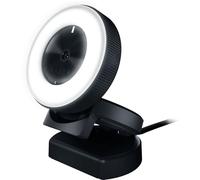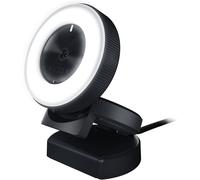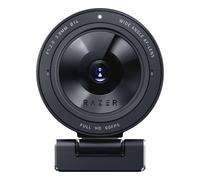
Razer Kiyo - Streaming Camera with Ring Lighting (USB Webcam, HD Video 720p, 60 FPS, Compatible with Open Broadcaster Software, Xsplit, Autofocus, Camera Clip, Tripod Connection) Black
Razer Kiyo - Streaming Camera with Ring Lighting (USB Webcam, HD Video 720p, 60 FPS, Compatible with Open Broadcaster Software, Xsplit, Autofocus, Cam

Based on a total of 115,699 customer reviews from independent review platforms.
Sources & Transparency:
The values are derived from publicly available retailer ratings from platforms such as Feefo, http://Reviews.io , Trustpilot, and others, and are aggregated monthly.
All brand names and logos are the property of their respective owners.
Notice:
pricehunter.co.uk cannot guarantee that published shop ratings originate from consumers who have actually made a purchase from the reviewed retailer.
Kiyo Streaming Camera with Ring Lighting (USB Webcam HD Video 720p 60 FPS

Based on a total of 21,561 customer reviews from independent review platforms.
Sources & Transparency:
The values are derived from publicly available retailer ratings from platforms such as Feefo, http://Reviews.io , Trustpilot, and others, and are aggregated monthly.
All brand names and logos are the property of their respective owners.
Notice:
pricehunter.co.uk cannot guarantee that published shop ratings originate from consumers who have actually made a purchase from the reviewed retailer.
🤖 Ask ChatGPT
Product Information
Logistics data
| Country of origin | China |
| Harmonized System (HS) code | 9006990000 |
System requirements
| Minimum RAM | 500 MB |
Microphone
| Number of microphones | 1 |
| Microphone direction type | Omnidirectional |
| Built-in microphone | Yes |
Weight & dimensions
| Weight | 390 g |
| Width | 69 mm |
| Height | 0.48 mm |
| Depth | 69 mm |
Software
| Windows operating systems supported | Windows 10, Windows 7, Windows 8, Windows 8.1 |
Design
| Cable length | 1.5 m |
| LED indicators | Yes |
| Mounting type | Clip/Stand |
| Product colour | Black |
| Interface | USB |
Performance
| Minimum illumination | 10 lx |
| Still image resolution(s) | 2688 x 1520 |
| Maximum video resolution | 2688 x 1520 pixels |
| Megapixel (approx.) | 4 MP |
| Auto focus | Yes |
| Maximum image resolution | 2688 x 1520 pixels |
| Photo feature | Yes |
| Video formats supported | YUY2 |
| Supported video modes | 360p, 480p, 720p, 1080p |
| Camera HD type | Full HD |
| 3D | Yes |
| Maximum frame rate | 60 fps |
Packaging content
| User guide | Yes |
Packaging data
| Package type | Box |
| Package width | 175 mm |
| Package depth | 175 mm |
| Package height | 75 mm |
| Package volume | 420 cm³ |
| Package weight | 439 g |
| Quantity | 1 |
Product information
At a glance
- 720p HD resolution for clear video quality
- Built-in adjustable lighting enhances your visuals
- USB connectivity ensures easy compatibility
Note: This text was created with the help of AI.
Upgrade Your Streaming Game with the Razer Kiyo
If you're a streamer, content creator, or someone who values high-quality video calls, the Razer Kiyo is the perfect companion for your setup. This webcam is designed to cater to a wide range of users—from gamers to professionals—who demand clarity and performance in their video quality. With its impressive features, the Kiyo is sure to elevate your live streams or virtual meetings to a whole new level. For more options, check out our selection of Webcams!
Exceptional Video Quality and Features
The Razer Kiyo boasts a remarkable 720p HD resolution at 60 frames per second, ensuring that your video is smooth and sharp. The standout feature is its built-in adjustable ring light that provides customizable lighting options, perfect for dim environments or achieving that professional look without additional equipment. The Kiyo also supports a versatile field of view, allowing you to capture a wider area, which is ideal for group streaming or showcasing your full setup.
Stylish and Functional Design
Not only does the Razer Kiyo perform well, but it also looks fantastic on your desk. Its sleek, modern design features a compact form factor that fits seamlessly into any streaming or work environment. The adjustable stand allows you to position the webcam at the perfect angle, while the sturdy build ensures it remains stable during use. Plus, with its striking Razer aesthetic, it’s a great addition to any gaming setup, making it as much a statement piece as it is a functional tool.
Easy Setup and Compatibility
Getting started with the Razer Kiyo is a breeze. It connects via USB, making it compatible with a wide range of devices and platforms. The setup process is simple—just plug it in, and you're ready to start streaming or chatting. With support for popular streaming software and platforms, including OBS and XSplit, the Kiyo integrates effortlessly into your workflow. This makes it ideal for anyone looking to enhance their video communication without a steep learning curve.
Note: This text was created with the help of AI.
How well did the information meet your expectations and assist you further?
 Not at all

 Neutral

 Very much
Similar products